Special PrismHR Processes Dashboard
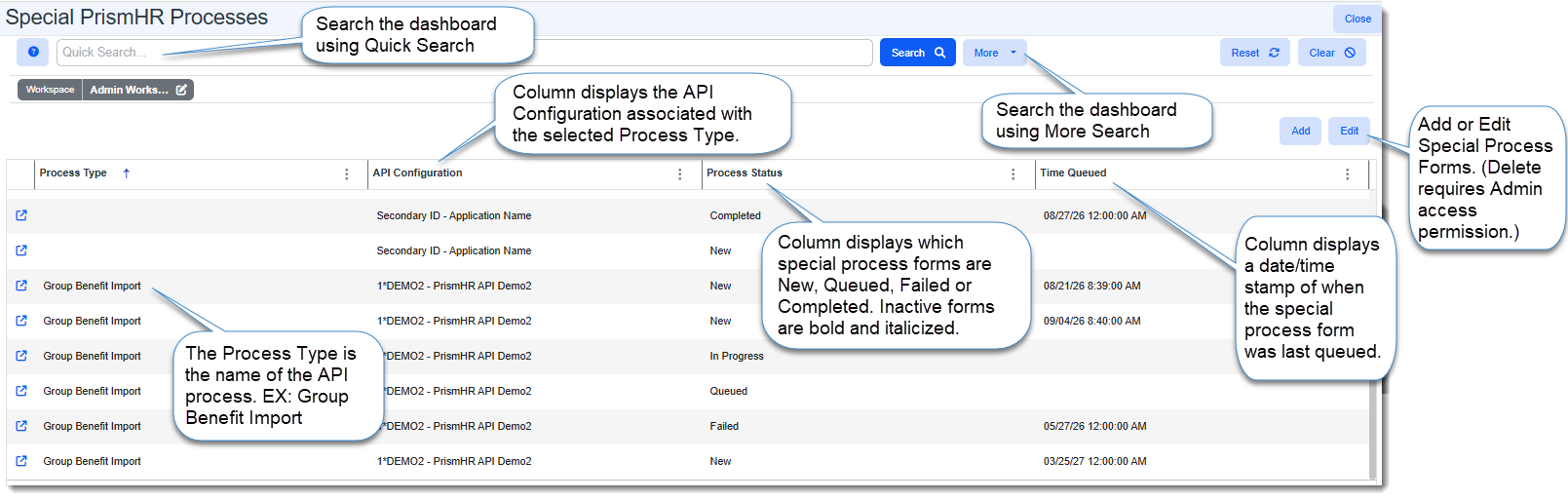
Use the Special PrismHR Processes Dashboard to manage PrismHR custom import and export processes that are run separate from the PrismHR Initial and Ongoing API processes.
You can:
-
Search for and open (Edit) an individual Special PrismHR processes record. For instance, you may need to re-queue the record if the scheduled process failed to execute so that the scheduled process will process it again.
-
Add new Special Processes records to schedule an import/export or Delete records.
Note: The ability to View only, Add, Edit or Delete records from the dashboard is dependent on your assigned access permissions. The ability to Delete requires Admin access permissions and is only permitted on records with a Process Status of New.
-
Filter by Date Created, or Date Updated, and Effective Date using More search.
-
Use Quick Search to search by keyword.
Accessing the Special PrismHR Processes Dashboard
The Special PrismHR Processes dashboard is located in the Admin workspace.
To access the Admin Workspace:
There is more than one way to access the Admin Workspace:
-
From the modules bar, click
 Workspaces.
The Workspace Search dashboard opens.
-
Type %Admin in the search box to filter the list of workspaces and locate Admin Workspace.
OR
-
On the modules bar, on the right side, click <username> > Modules.
The Modules Search dashboard opens. If the Admin Workspace has been saved as a module for easy access, it is listed at the top of the dashboard.
Double-click the row of the Admin Workspace in the Workspace Search or Modules Search grid or click  (Open) next to the workspace name.
To access the Special PrismHR Processes dashboard:
-
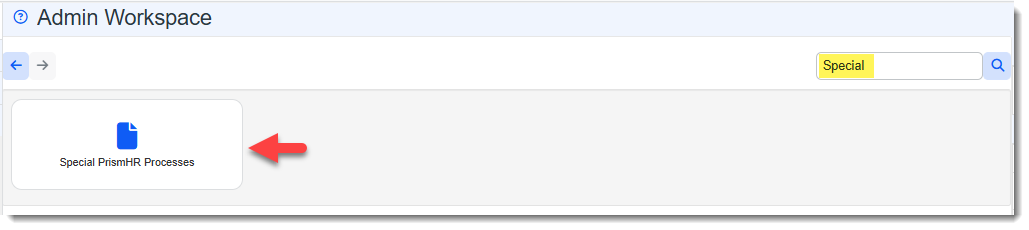
Once in the Admin Workspace, type "Special" in the "search for dataform" box and then press Enter or click the magnifying glass icon
 to display the Special PrismHR Processes tile.
 -
Click the tile to open the dashboard.
Note: Alternatively, you can access the dashboard from the Modules Search dashboard by selecting Special PrismHR Processes Search.