BPM General Configuration
Note: If you are interested in using BPM and you do not have this feature yet, please submit an extranet case or contact your ClientSpace representative. The use of BPM requires an App Settings permission that can only be enabled by a ClientSpace representative.
General configuration for BPM consists of:
-
BPM Site Configuration
-
BPM Business Rules
-
BPM Entity-Based Role Permissions Assignment
-
BPM Benefit Plan Contribution Method Display Values
Also refer to the BPM Workspace and Batch-Related Configuration article for workspace-related and Benefits Batch-related configuration topics.
BPM Site Configuration
Before you start using BPM, configure the BPM Welcome and Login pages to make them your own. This is where you can:
-
Add a custom portal name.
-
Add additional login instructions.
-
Edit "welcome text.
-
Add your company logo.
This page also contains a field named Do Not Show on BPM . This multi-lookup field allows you to always hide one or more of the following plans in BPM if you do not offer them: HSA, FSA, Commuter Plan.
See BPM Site Configuration for details.
BPM Business Rules
Most BPM business rules are pre-configured for you.
Two BPM business rules are used to automatically set the value in the Open to BPM field to Yes or No on a Benefits Batch. When the Status of the Benefits Batch is set to Client Review, Open to BPM is set to Yes and your customer receives an email notification that benefits are ready to review.
Another preconfigured business rule, Reject OBPs, is a Save operation rule that uses the BPM pipeline and the BPMSubmit Header Action(HdrAction). It is use to manage rejected OBPs. The BPMSubmit HdrAction one of the six HdrAction triggers that you can use to create additional Save operation business rules in BPM. The HdrAction rules are covered in the topic referenced below.
See Configuring BPM Business Rules for details.
Internal BPM Entity Role Permissions Assignments
Internal BPM access permissions are controlled by View, Edit, or Admin access to the BPM_Access entity which is currently assigned on the Benefits_Member role.
These access permissions make the Internal BPM Access link available and functional on a Benefits Batch where Open to BPM = Yes. By default, the BPM_Access entity is added to the Benefits_Member role with Edit permissions enabled. Edit permissions allow Benefit team members to have full edit access while View permissions allow other internal team members to view the batch details without editing. Removing the entity hides the Internal BPM Access link.
See Internal BPM Access Permissions.
BPM Benefit Plan Contribution Method Display
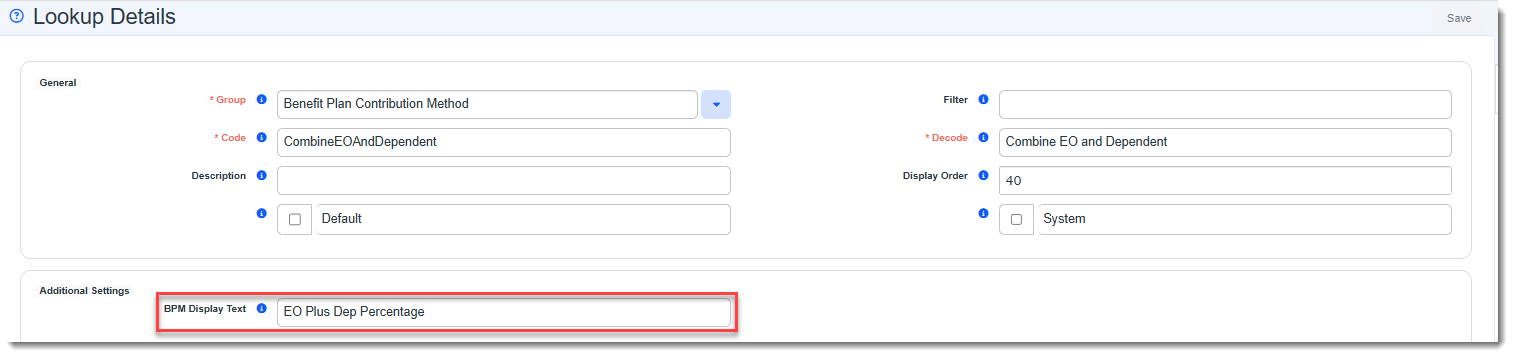
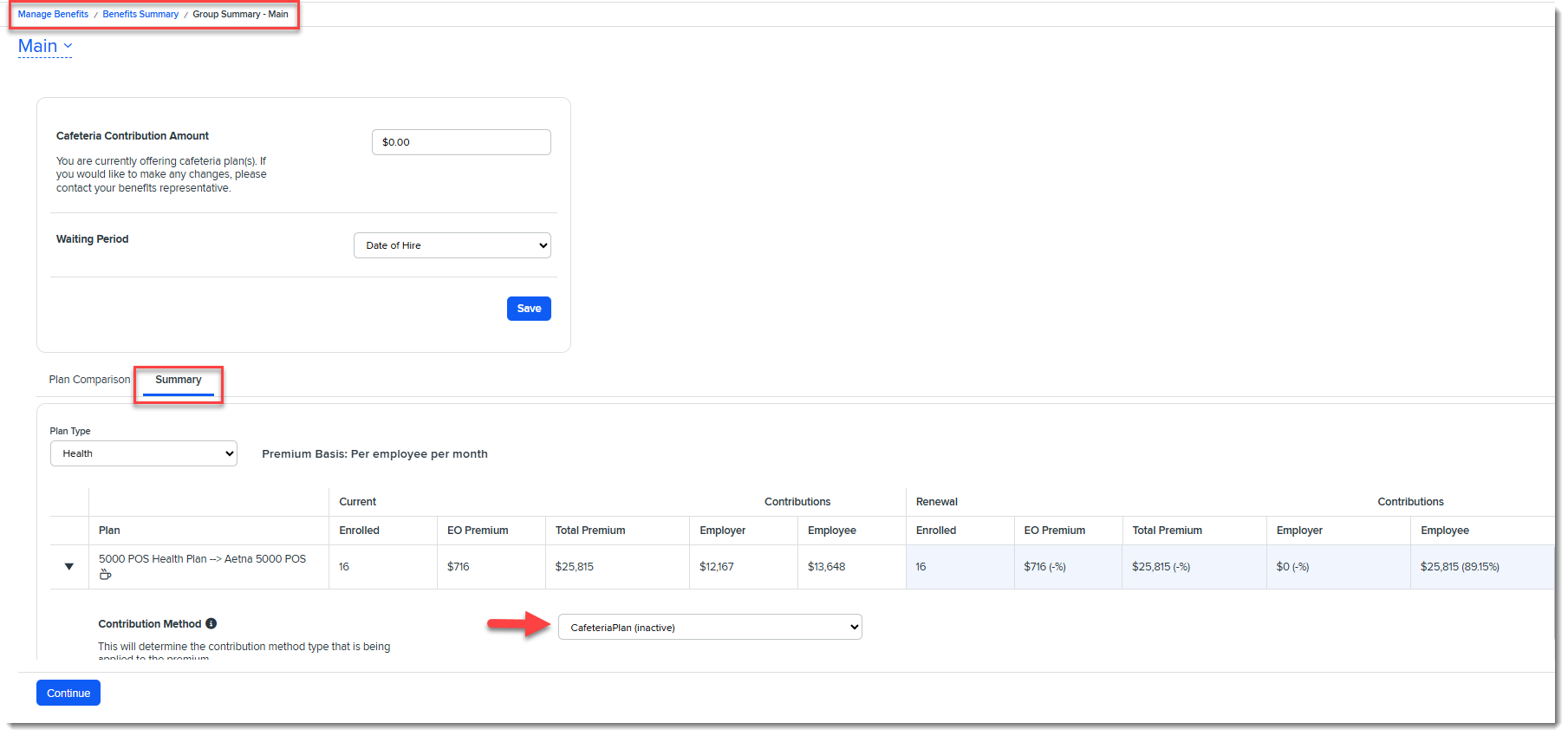
Some of the default Contribution Method drop-down list values in BPM (Manage Benefits > Benefits Summary > Group Summary > Summary) can vary from the ClientSpace Contribution Method drop-down list values set on Offered Benefit Plans (OBPs). You can control the values that display in BPM by making them match ClientSpace or you can set them to other values entirely. This is done from by accessing the Benefit Plan Contribution Method Lookup Details for each lookup and updating a field named BPM Display Text. When this field is populated, BPM displays this value for the Contribution Method instead of the lookup Decode value.
Note:
-
The BPM Display Text fields for each contribution method Lookup Detail record are pre-populated with existing BPM values.
-
If you edit BPM Display Text, ClientSpace OPBs will continue to display the Decode value. If you want the two values to match, you will need to set the BPM Display Text value to match the Decode value.
-
The Lookup Details form is also where you can flag a lookup value as inactive by unchecking the Active flag. Inactive contribution methods do not display in the BPM Contribution Method drop-down list unless it was used on an OBP in your BPM Group Summary prior to the contribution method being inactivated. For instance, if you are reviewing a prior year's plan that was a Cafeteria plan but is no longer being offered as a Cafeteria plan in the renewal year, the Cafeteria plan displays in the Contribution Method list as "read only" with the word "inactive" displayed next to it in parentheses. EX: Cafeteria Plan (inactive).
See Configuring BPM Contribution Method List Display Values.
Topics in this chapter