R162 Sprint: 3/2/2026 to 3/31/2026. To learn about product features that you may not recognize, contact ClientSpace Professional Services.
Release Schedule
Release updates are implemented by the group, as indicated in the following table.
The release schedule is subject to change and updated as required. To determine your group or ask questions, please log a case for ClientSpace Professional Services.
|
Sprint 3/2/2026 to 3/31/2026 |
||
|---|---|---|
|
Upgrade groups |
Date of upgrade |
Tentatively occurs on |
| Group 1 | First Tuesday of the month | April 7, 2026 |
| Group 2 | Second Tuesday of the month | April 14, 2026 |
| Group 3 | Third Tuesday of the month | April 21, 2026 |
Enhancements
Enhancement groups are Change in Functionality, ClientSpace Premium (ClientSpace with additional modules), Advanced Administration, General, and Staffing.
ClientSpace Premium
ClientSpace API
Benefit Plan Manager (BPM)
|
Case |
Enhancement |
|---|---|
|
73285 |
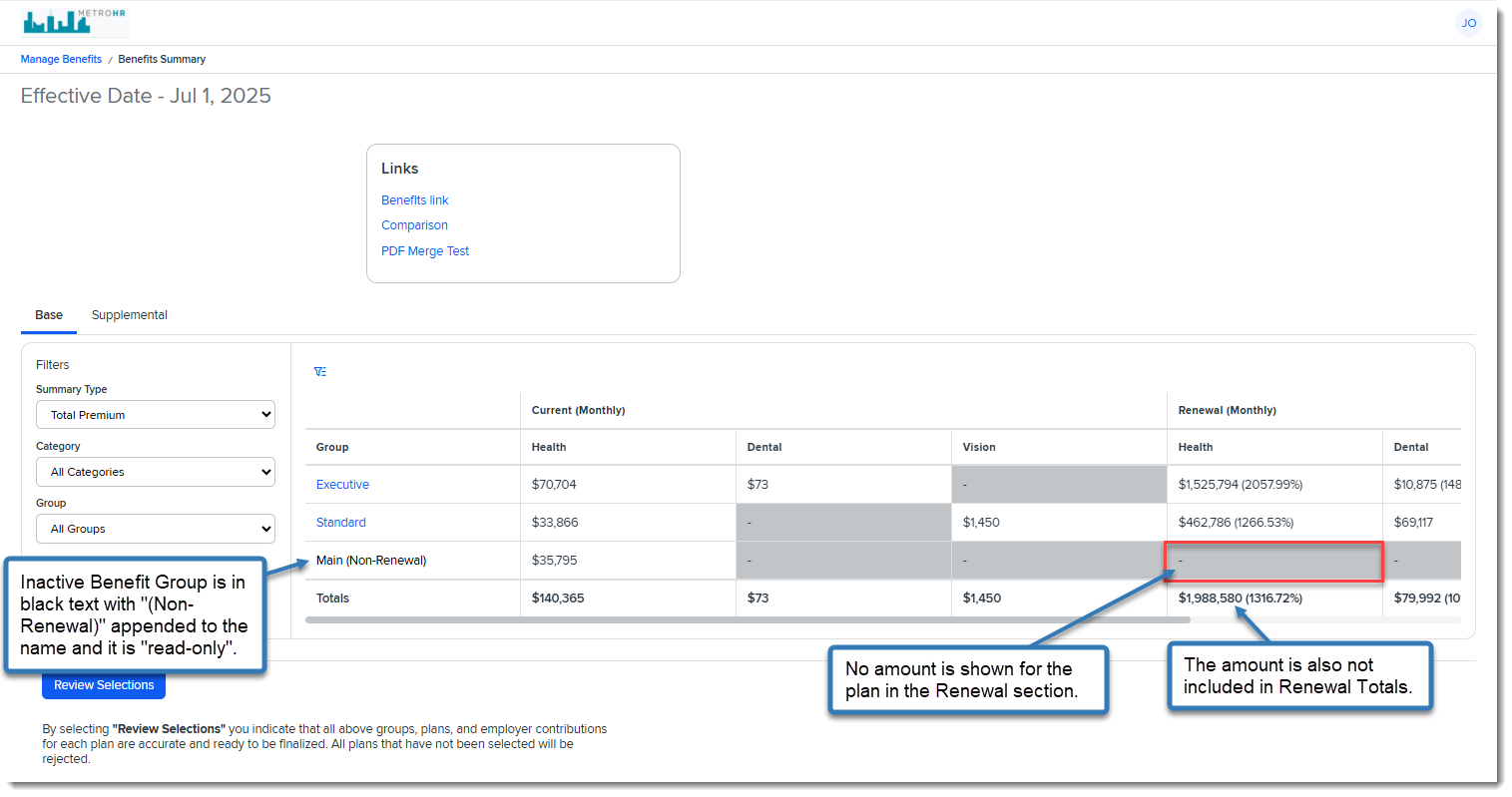
Updated Handling of Inactive Benefit Groups Previously, Inactive Benefit Groups containing Active Offered Benefit Plans (OBPs) appeared the same as Active benefit groups in BPM and also were included in Selection Summary/Signature page calculations. Now, the following changes have been made to allow BPM users to review historical benefit groups that are now Inactive without the Benefit Groups being editable or included in the renewal totals or Selection Summary/Signature page calculations: On the Manage Benefits > Benefits Summary Page:
On the Manage Benefits > Benefits Summary > Group Summary >Plan Comparison Tab:
On the Selection Summary/Signature Page:
See: |
| 76430 |
Updated BPM Manage Benefits > Benefits Summary > Base Tab Label Text to "Monthly" Instead of "Yearly" Previously the BPM Manage Benefits > Benefits Summary > Base tab Current and Renewal column label text displayed as Current (Yearly) and Renewal (Yearly). Now, this has been changed to Current (Monthly) and to accurately reflect the data displayed. See: |
|
76472 |
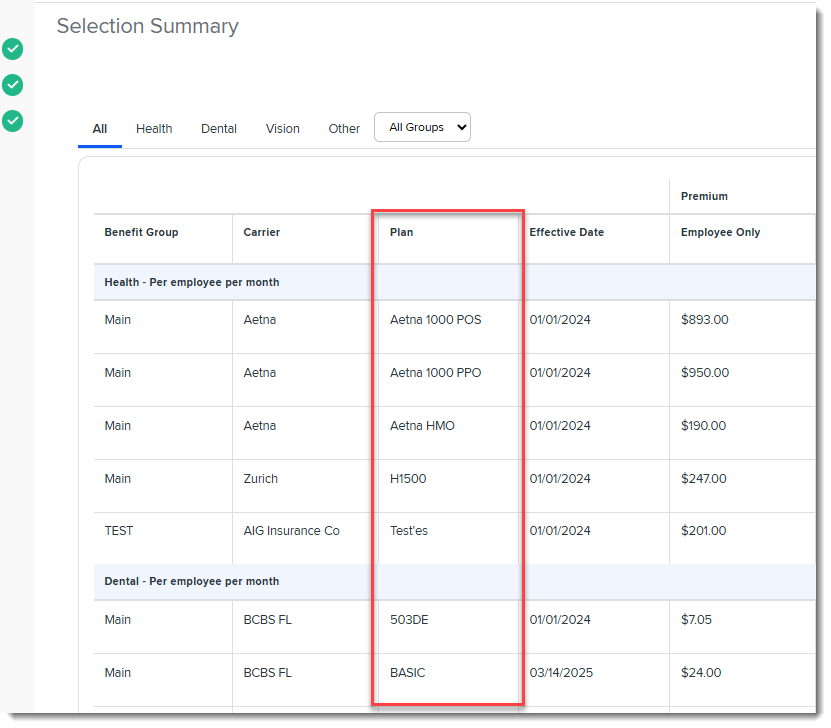
Updated BPM Selection Summary "Plan ID" Column to "Plan" Previously, on the Selection Summary/Signature page of BPM, the Plan ID column in the grid displayed the Plan ID. Now, the column name has been changed to Plan and it displays the Plan Title (if available) up to 60 characters.
Note:
See: |
| 76622 |
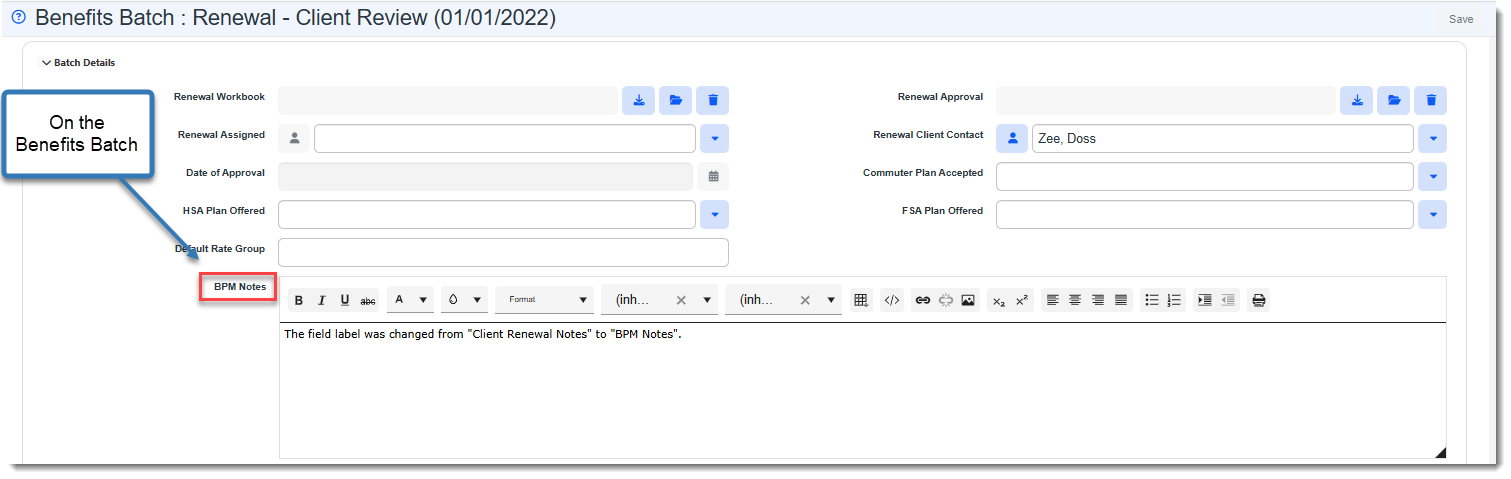
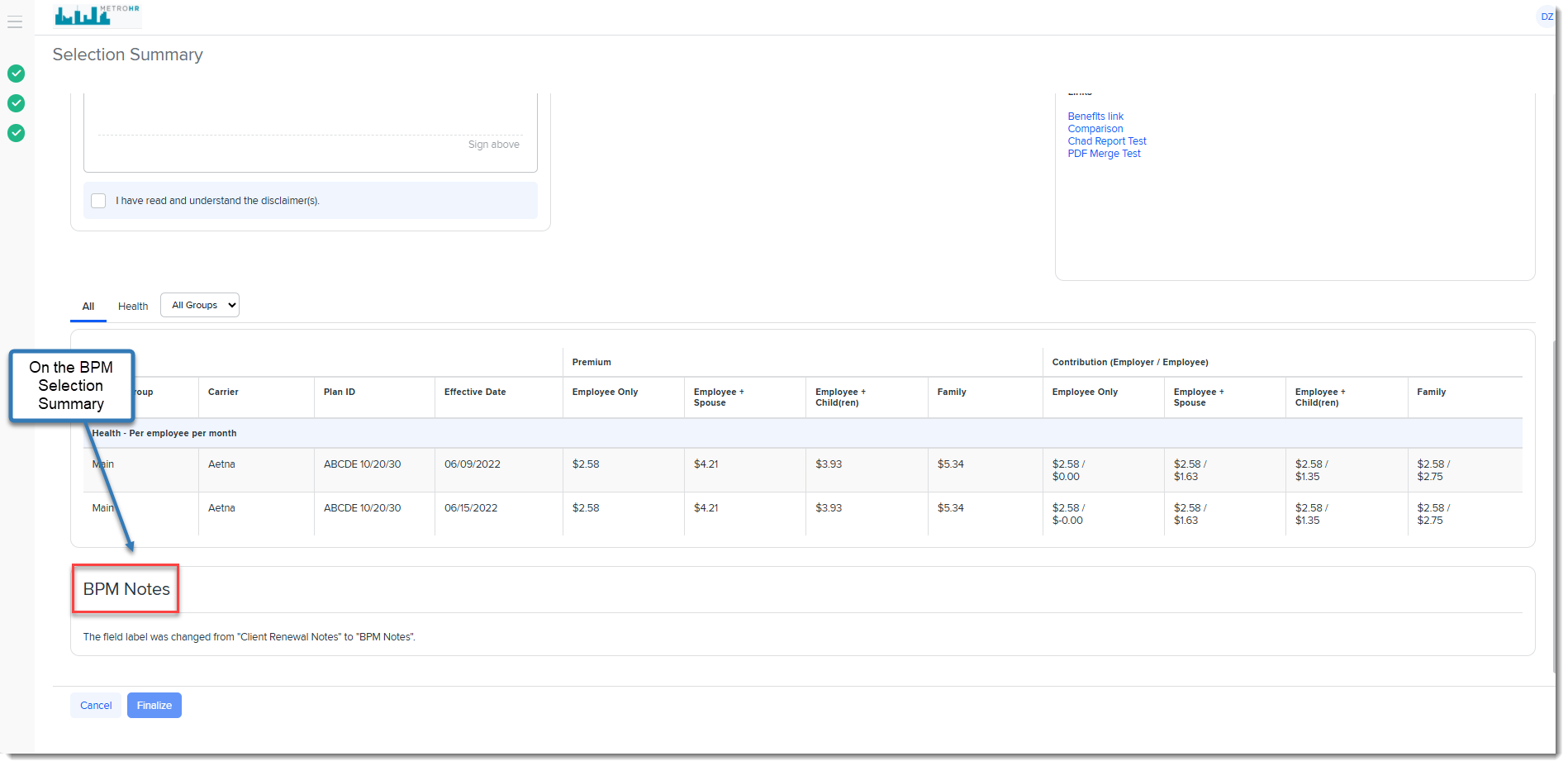
Benefits Batch "Client Renewal Notes" Field Label Customization Now Displays In BPM If you customize the field label of the Benefits Batch Client Renewal Notes field, the label text change now displays on both the Benefits Batch dataform and the BPM Selection Summary/Signature page. In the example below, the "Client Renewal Notes" field label was changed to "BPM Notes" as reflected on the Benefits Batch dataform and in BPM:
See: |
|
76643 |
Corrected BPM "Plan Type" Display Inconsistency with "Suppress from Presentation" Options Previously, when Suppress from Entire Presentation was selected on a Benefits Plan in a scenario where plan suppression resulted in no plans being left in the Plan Type category (such as when there was only one plan in the category and it is now suppressed), the plans as well as the Plan Type were able to be navigated to. Removing the Plan Type from the drop-down list on the Plan Comparison tab ( Manage Benefits > Benefits Summary > Group Summary >Plan Comparison) prevented the user from selecting a Plan Type containing no plans. |
|
76656 |
Related Org on BPM Additional Contacts Dataform Now Defaults to Current Org Previously, when adding a new BPM Additional Contact record, you had to select the contact's organization in the Related Org field before you could select the contact. Now, the Related Org field value defaults to the Workspace's associated organization but can be edited, if necessary. |
|
77398 |
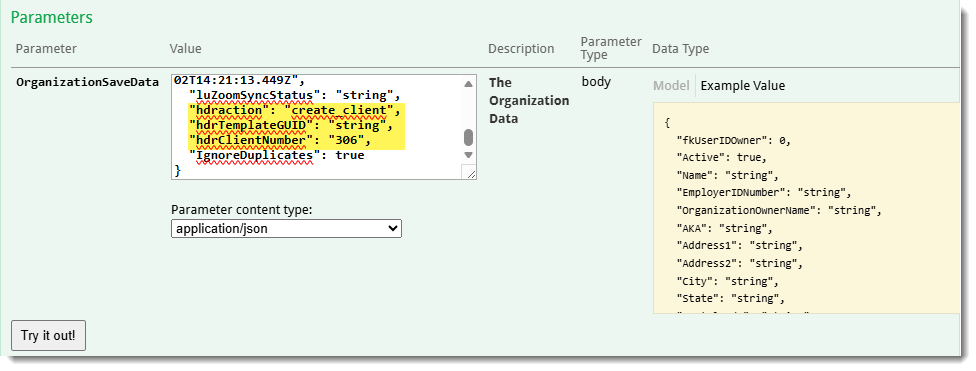
Modified "UpdateRenewalContactAccess" Business Rule Method to Set Foreign Key Relationship Between the Benefits Batch and Additional Contact Record. The UpdateRenewalContactAccess business rule method was modified to save a newly created or imported Benefits Batch first before saving the Additional Contact record. This was done to set the foreign key (fk) relationship between the Benefits Batch and Additional Contact record. |
Other ClientSpace Premium
|
Case |
Enhancement |
|---|---|
|
71581 |
Updated Pricing Console Surcharge Security Entities Related to Editing Surcharge Types Previously Sales users could override the Surcharges bill rates, even though they didn't have access to the Surcharge Type. Now, Pricing Console Surcharges security entities have been updated to work as follows:
See: |
| 76173 |
Added "Benefit Expirations" Scheduled Process to Inactivate Expired Benefit Batches and Benefit Plans A new scheduled process named Benefit Expirations has been added. It inactivates (i.e., unchecks the Active checkbox) on Benefit Batches and Benefit Plans that have either reached their expiration date or have been placed in Expired status. This keeps expired Benefit Batches and Benefit Plans from displaying in any relevant drop-down lists where only the display of Active items is desired. Note: Global Admins with Advanced Admin access may activate this scheduled process. For all others, please contact your Professional Services team representative or log an extranet case if you are interested in this feature. See Scheduled Processes. |
| 74816 |
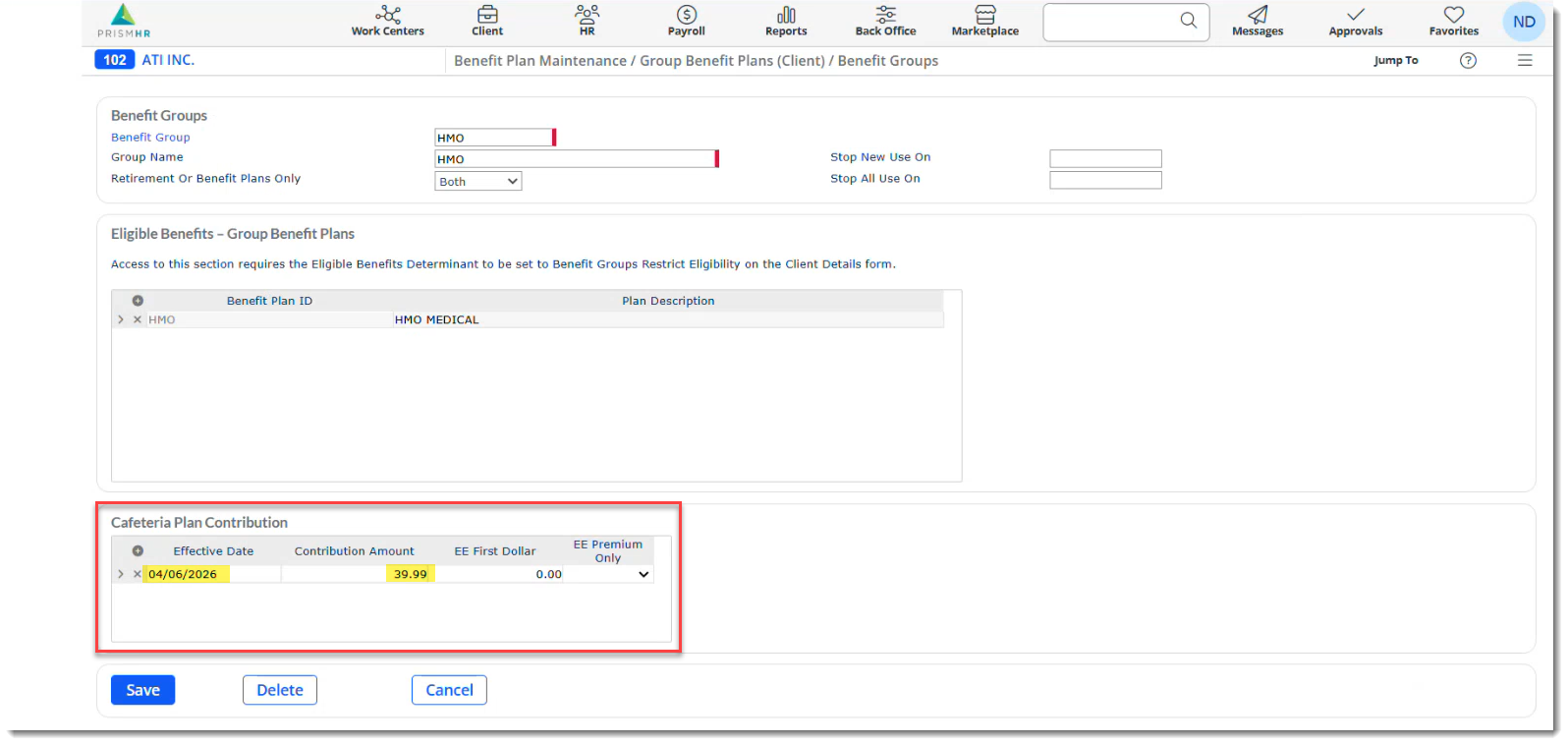
Enhanced Benefit Plan Export API to Export New and Updated Cafeteria Plan Benefit Group Details When you click the Export Plans to Prism link on a Benefits Batch, the ClientSpace Benefit Plan Export API "ExportBenefitGroupsToPrism" rule has now been enhanced to export Cafeteria Plan Benefits Group details to PrismHR, including the associated Benefits Batch Effective Date and the associated Benefit Group Cafeteria Contribution. Both new and updated Cafeteria Plan Benefits Group details export to PrismHR to the Benefit Plan Maintenance > Group Benefit Plans (Client) > Benefit Groups > Cafeteria Plan Contribution grid into the Effective Date and Contribution Amount fields:
|
Advanced Administration and System Administration
|
Case |
Enhancement |
|---|---|
| 73724 |
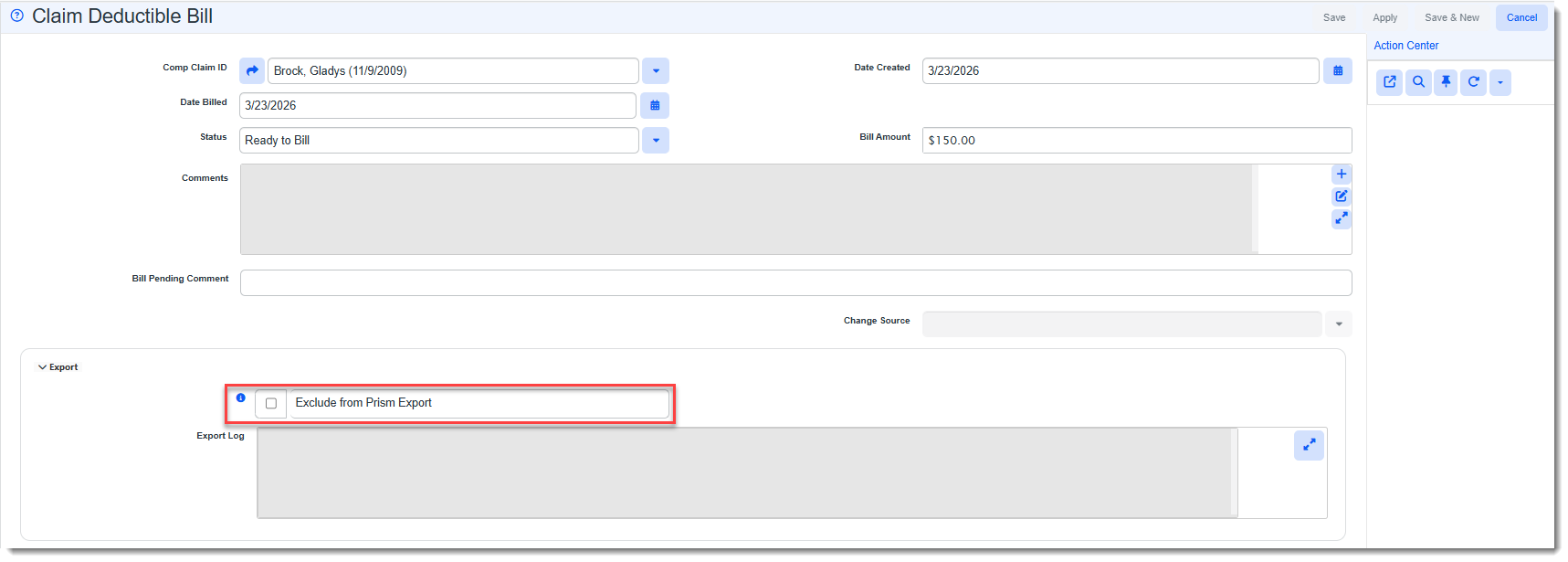
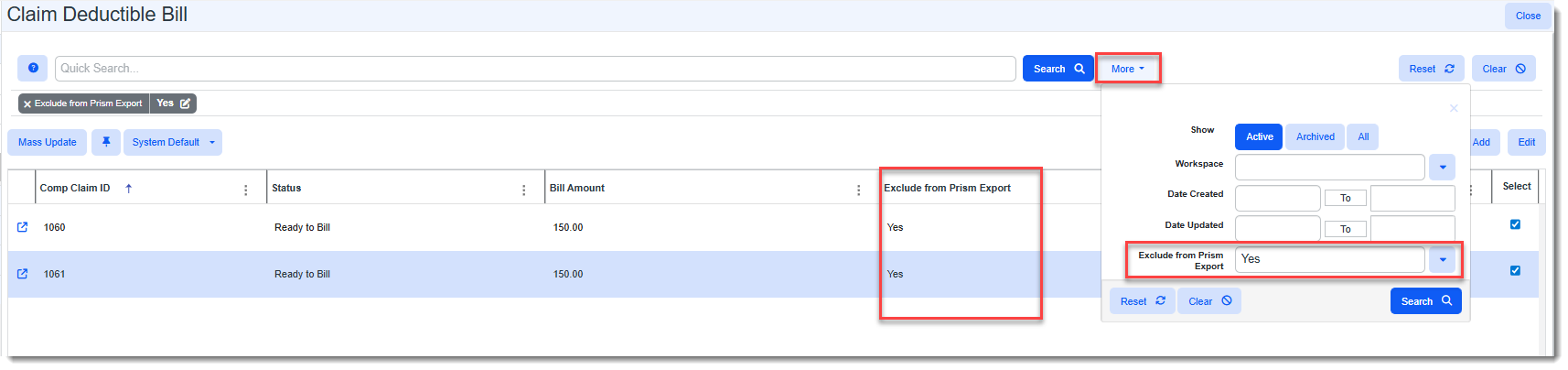
Added Ability to Exclude Claim Deductible Bills from Prism Export If you have Claim Deductible Bills that are billed outside of PrismHR, you can now prevent them from being included in the "Bill Pending" export to PrismHR (even if a Claim Deductible Bill is in "Ready to Bill" status). A new Exclude from Prism Export checkbox has been added to the Claim Deductible Bill form. When checked, the Claim Deductible bill is excluded from export to PrismHR.
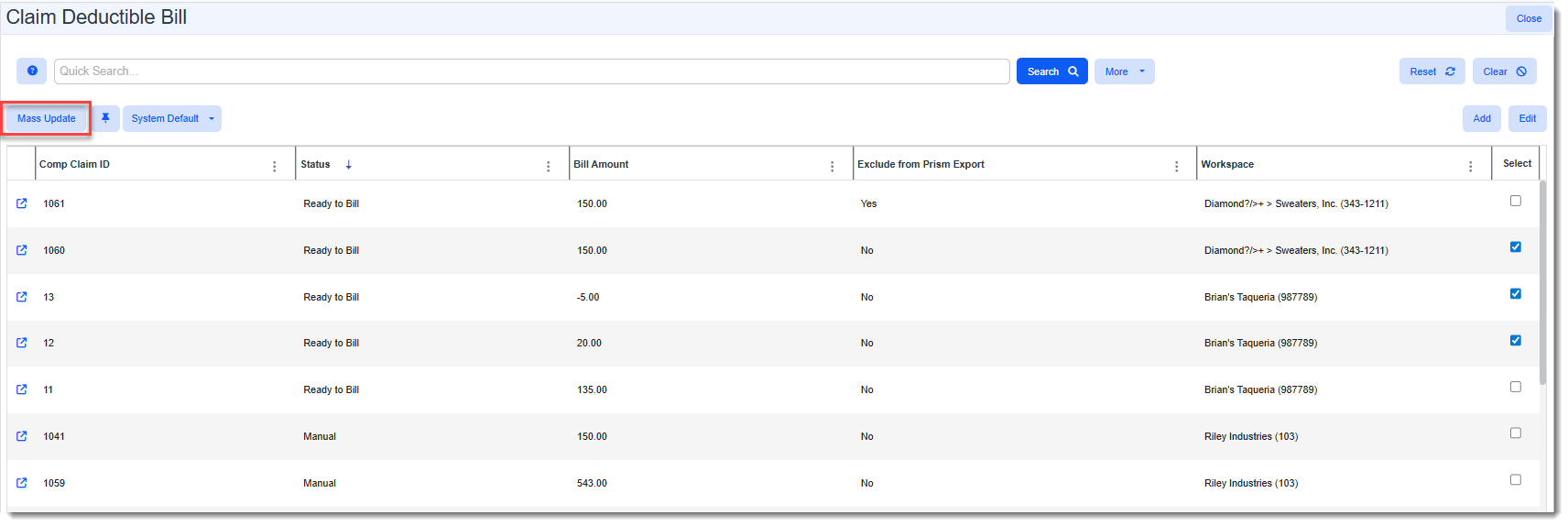
Additionally, a new Mass Update feature has been added to the Claim Deductible dashboard (accessed from the Modules toolbar or from Modules Search by clicking your username and then selecting Modules in the upper right corner of ClientSpace). Mass Update allows you to set Exclude from Prism Export and Status field values on multiple Claim Deductible bill forms at once.
The dashboard also now displays an Exclude from Prism Export column and an Exclude from Prism Export search option has been added to the More search.
See: |
| 74667 |
Hid "Out of Office" Fields on User Details Dataform When User Type is "External" Previously, when the User Type was set to "External" on the User Details dataform (System Admin |
|
75412 |
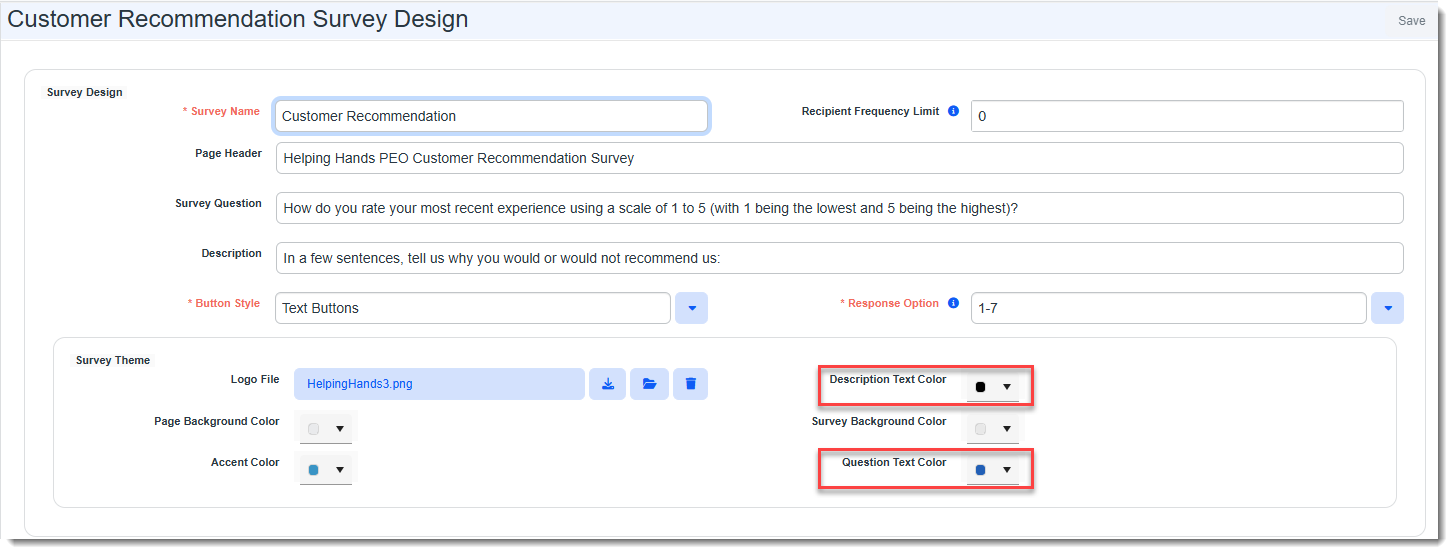
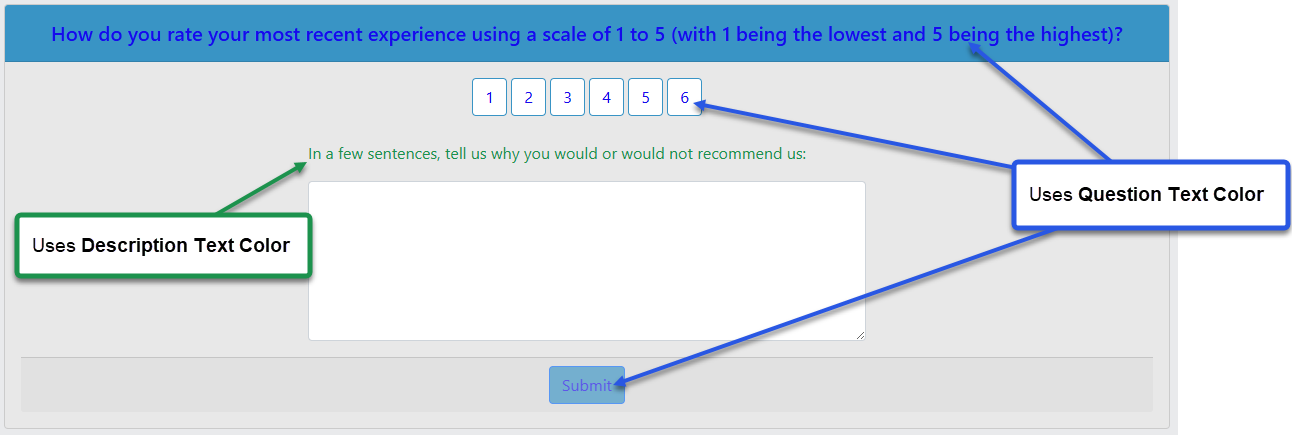
Added Ability to Change Survey Question and Survey Description Text Color Independently Previously, there was a single Text Color field located in the "Survey Theme" fieldset of the Survey Design page that controlled the color of both the survey question and survey description text. Now, you can set the survey question and survey description text independently using the following two fields:
Note: Question Text Color also sets the color of the Submit button text and the Rating Scale text.
|
|
75539 |
Improved Salesforce API Handling of Deleted Objects Previously, when an object was deleted in Salesforce that was already linked to a record in ClientSpace, if any changes were made to the object in ClientSpace, the system continually exported requests to update the record. There was no way to inactivate the associated ClientSpace record(s) for the deleted Salesforce object.
Now, when a Salesforce object is deleted, a Salesforce Work Queue field named RecordDeleted__c (with two underscores before "c") set to True is created for the deleted object. When the Salesforce Scheduled Process runs in ClientSpace, it checks for RecordDeleted_c fields set to True. If found, the ESL for the associated Object Type (ObjectType), Object Record (ObjectRecordID) or ClientSpace table is located. Then, the ESL record is selected and the associated ClientSpace record is inactivated.
Note:
|
|
75604 |
Added "Remote Location?" Checkbox to Client Location Dataform Set by PHRAPI Initial Import A Remote Location? checkbox has been added to the Client Location dataform (System Admin To support this process, a RemoteLocation Import Map Detail record has been added to both the PHRAPI_initial_location*.csv and PHRAPI_location*.csv Import Map Header configuration files (System Admin |
|
76191 |
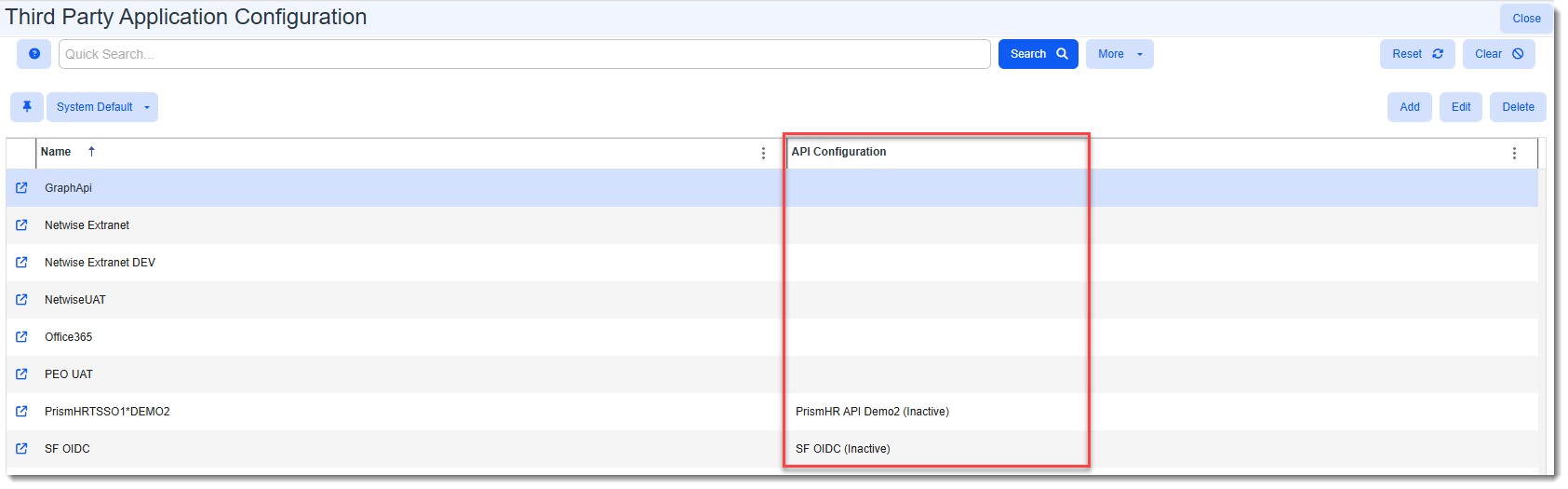
Added "API Configuration" Column to Third Party Application Configuration Dashboard An API Configuration column has been added to the Third Party Application Configuration Dashboard (System Admin
Note:
|
|
76199 |
Updated Outlook Add-In to Use New PrismHR Logo To get the new PrismHR lob in the Outlook Add-In, uninstall and reinstall the add-in. |
|
76470 |
Dataform Modules Did Not Respect Unchecked "Search on Load" Configuration Setting/Unlocked "Search on Load" for Singleforms Previously, when a dataform was configured as a module (System Admin In addition, the Search on Load dataform property has now been unlocked to work with single dataforms (i.e., singleforms). This includes workspace singleforms and singleforms configured as dataform modules. Note: To use Search on Load with any multi-form or single dataform configured as a module, an administrator must configure grid columns in the Dataform Properties Multi Col column. If no columns are configured, when the search dashboard loads, the following error message displays: "Grid columns have not been configured for this search page". See: |
|
76586 |
Updated "Duplicate Field" Hard Error Trigger Logic Previously, when updating a field on a dataform that had a field with the same name on an associated tab, a hard error message displayed. In these instances, the duplicate field names existed before the business rule existed. Now, the "Duplicate Field" hard error trigger logic has been adjusted to only trigger when a user attempts to add a duplicate field on a dataform or associated tab. It no longer checks for duplicate field names when editing existing fields. |
|
76588 |
Added Import Mapping Configuration Backup and Restore Configuration backup and restore is now available on the Import Map Header Search dashboard (System Admin Note:
|
| 76918 |
Added Manager as a Workflow Item or Email Template Field Replacement Option You can now include an employee's manager as a Replace Field on the Content tab of a Workflow item or Email Template if the workflow or email template uses the Employment record as the triggering dataform. The manager name is displayed as Lastname, Firstname (EEID). The Manager Replace Field is located in the "Employment" section of the Replace Fields window and is named {gen_EmployeeEmploymentInformation.fkManagerID}. Note: To make this available as a replace field in Email Templates, it was added to the following merge procedure: peo_employee_emailtemplate_recipient_v2_proc. |
|
77130 |
Removed "IMAP" Mailbox "Type" Option for New Email Integration Configurations As IMAP is being deprecated by Microsoft, we recommend switching to Microsoft Graph API, a supported and more secure authentication method if you have not done so already. Currently, you can continue to use IMAP for existing email integrations in ClientSpace. However, with the release of ClientSpace version 162, you will no longer be able to set up new email integrations using IMAP as the IMAP option has been removed from the Type field of the mailbox configuration window (System Admin |
 >
> 
 >
> Technical Enhancements
|
Case |
Enhancement |
|---|---|
|
73583 |
Upgraded Outlook Add-In to Use GraphAPI The Outlook Add-In has been upgraded to use GraphAPI. This change requires a new method of posting attachments which previously required full mailbox access to act as the user to post attachments, but now only needs read-only access. If you have not already done so already, you will need to uninstall and reinstall your Outlook Add-In and apply the latest version of the manifest file. For steps on installing the Outlook Add-In, please see: |
|
77006 |
Removed User and Contact Admin System Vulnerabilities to Deter Cyberthreats The following vulnerabilities were removed to deter potential cyberthreats related to user and contact administration.
See: |

Fixes
|
Case |
Issue summary |
Resolution |
||||||||||
|---|---|---|---|---|---|---|---|---|---|---|---|---|
|
72269 |
Corrected GMail External Calendar Sync Issue |
Previously, the following error sometimes displayed when clicking the Resync button on a ClientSpace calendar set up to integrate with an external Gmail calendar: "There was a problem connecting to your external calendar. Please review the help document - "Adding External Calendar Events" for information on how to resolve this issue. Cannot insert the value NULL into column 'Subject', table 'ClientSpace.dbo.tblExternalCalendarEvents'; column does not allow nulls. INSERT fails. The statement has been terminated." This issue occurred when one or more Gmail calendar events had a blank title. Now, Gmail calendar events with no title import successfully. |
||||||||||
|
72852 |
Corrected Issue of Grid Columns Shifting or "Jumping" When Resizing Using the Drag Handle |
Previously, when you attempted to resize a grid column on a dashboard or widget using drag and drop, the columns became unstable and appeared to shift or "jump" to a different position. This issue has been corrected. |
||||||||||
|
74673 |
Corrected Issue of OBP Import Requiring Case-Sensitivity and Not Finding a Match When Comparing Plan ID to Carrier Plan Code |
Previously, the OBP Import performed a case-sensitive comparison of the PrismHR Plan ID and the ClientSpace Carrier Plan Code (which is located on the OBP's associated Benefit Plan record) to determine a match when updating OBPs. If the case was not the same, no match was found and therefore, no update occurred. Now, case-sensitivity is no longer required for determining a match of Plan ID and Carrier Plan Code. |
||||||||||
|
74943 |
Corrected User Modal Window Bug |
Previously, when you clicked the User |
||||||||||
|
75165 |
Corrected Issue of Dataform Location No Longer Defaulting the Dataform Name When Configuring Dataform Field Display Rules, Custom Links, Email Templates and Workflows |
When adding a new Field Display Rule on a dataform or configuring Custom Links, Email Templates and Workflows from a dataform via Dataform Admin, the dataform location (i.e., the dataform name of the associated dataform) no longer defaulted as it did in previous releases of ClientSpace. This issue has been corrected. The affected fields are listed in the table below:
|
||||||||||
|
75301 |
Corrected Issue of Long URL Not Wrapping in "Delete Link" Window When Deleting an Attachment Link |
Previously, if you deleted an attachment link with a long URL in ClientSpace, when the "Delete Link" confirmation message displayed, the URL did not wrap properly and overflowed outside of the bounds of the confirmation message window as shown in the example below:
This issue has been corrected. The URL link now wraps inside of the "Delete Link" window. |
||||||||||
|
76407 |
Corrected Error That Displayed When Accessing the Audit Trail of Dataform With Special Characters in its Page Header |
Previously, if a dataform page header contained carat symbols (< >) and you clicked the Magnifying Glass |
||||||||||
| 76801 |
Corrected "Infinity" Employee Contributions % Error That Displayed When Entering OBP "Manually Set Dollars" Amounts With $0 Premiums |
Previously, on the Offered Benefit Plan (OBP), if 0.0000 was entered in the EE Premium, EC Premium, EF Premium or ES Premium fields, the Contribution Method was set to Manually Set Dollars, and dollar amounts were entered in the corresponding Dollar Amount fields, the word "Infinity" displayed in the percentage contribution fields (i.e., EO%, ES%, EC%, EF%). Now, when an infinity value is calculated, the percentage contribution fields display 0.0000. |
 icon next to a User lookup field in ClientSpace to display the User modal window (i.e., a popup window containing user details), if you left that window open and opened another modal window (i.e., User, Attachments, etc.), the first window did not close. Additionally, you could drag and drop the modal window. Now, when you leave a modal window open and click anywhere outside of it, it closes appropriately. Drag and drop functionality has also been removed.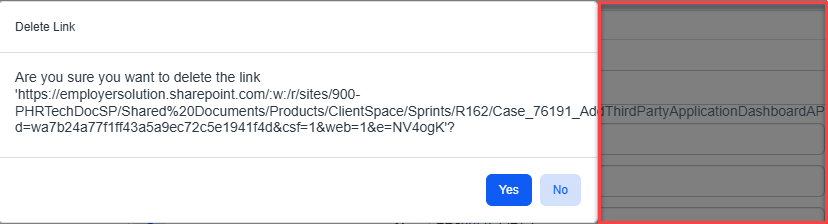
 in the Action Center to access the audit trail, "Sorry, an error has occurred" displayed. This was happening because ClientSpace uses the dataform header page header to create the Audit Trail page header and certain special characters are not accepted. Now, ClientSpace strips carat symbols (< >) from the dataform page header before building the Audit Trail page header.