R166 Sprint: 7/1/2026 to 7/31/2026. To learn about product features that you may not recognize, contact ClientSpace Professional Services.
Release Schedule
Release updates are implemented by the group, as indicated in the following table.
The release schedule is subject to change and updated as required. To determine your group or ask questions, please log a case for ClientSpace Professional Services.
|
Sprint 7/1/2026 to 7/31/2026 |
||
|---|---|---|
|
Upgrade groups |
Date of upgrade |
Tentatively occurs on |
| Group 1 | First Tuesday of the month | August 4, 2026 |
| Group 2 | Second Tuesday of the month | August 11, 2026 |
| Group 3 | Third Tuesday of the month | August 18, 2026 |
Enhancements
Enhancement groups are Change in Functionality, ClientSpace Premium (ClientSpace with additional modules), Advanced Administration, General, and Staffing.
ClientSpace Premium
ClientSpace API
|
Case |
Enhancement |
|---|---|
| 76543 |
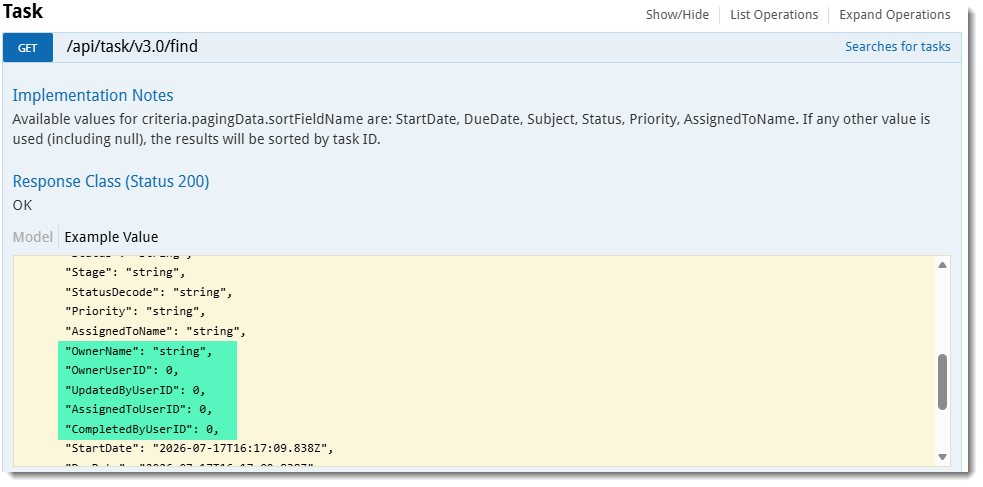
Updated ClientSpace API Version 3.0 Task Method The following Task Method has been updated in version 3.0 of the ClientSpace API: GET /api/task/v3.0/find The method now includes the OwnerName field, formatted as "Last Name, First Name." Additionally, the response now provides OwnerUserID, UpdatedByUserID, AssignedToUserID, and CompletedByUserID to facilitate easier joining with user data.
Note: Detailed documentation for client developers can be found in the Swagger interface by expanding the Organization section and then expanding each method. |
Other ClientSpace Premium
|
Case |
Enhancement |
|---|---|
| 67873 |
Improved Benefit Group Management via PrismHR API Two new date fields named Stop All Use On and Stop New Use On have been added to the PHRAPI_initial_codes_benefitgroup*.csv and PHRAPI_codes_benefitgroup*.csv import map header configuration records (System Admin |
|
74936 |
Added Survey Multi-Question Support Global administrators can now include multiple questions within a single survey by configuring additional questions on the Survey Design window (System Admin
IMPORTANT: If you want to create business rules using questions that trigger business logic, you must always set the Primary Trigger Field on the business rule configuration to BizLogic Triggered (chkBizLogicTriggered). If you do not do this, the business rule will never trigger as the Primary Trigger Field will never be evaluated. See: |
|
76670 |
Benefits Export API: Updated ExportOfferedPlansToPrism Business Rule The Benefits Export API now includes enhanced logic for exporting offered plans to PrismHR to reduce manual intervention. When One Month Prepay is selected on the Offered Benefit Plan (OBP), the system automatically adjusts the Pending Billing Rate Group Effective Date to one month prior to the OBP's Effective Date (i.e., OBP Effective Date minus one month). If One Month Prepay is not selected, the OBP Effective Date is used "as is". Additionally, new benefit plans will now use the OBP's Effective Date as the start date in PrismHR instead of the batch open enrollment start date. |
|
77077, 77208, 78061 |
The new Pricing Export API enables organizations to export pricing data from ClientSpace to PrismHR. This one-way export API supports the export of key pricing details, including:
|
| 77905 |
Added Client Benefits Plan Export Merge Template Enhancements The Client Benefit Plans Export Merge template has been updated as follows to improve the accuracy of Risk Factor and Rate Group data:
IMPORTANT: The Client Benefits Plan Export merge will no longer receive updates after ClientSpace Release 166. To ensure access to future enhancements and ongoing support, we recommend using the Benefits Plan Export API which will continue to be the supported solution for exporting benefits plan data. |
|
77996 |
Added Copy Plan Rates Rule and Inactivated Obsolete Rules A new Copy Plan Rates business rule was created to correctly include the risk factor when base rates are updated on an associated Offered Benefits Plan. The rule is Active by default and ensures that employer contributions remain accurate during plan renewals and rate group changes when using the Apply Plan Group, Clone Parent OBPs, Clone to Child Batches, or Renew functions on a Benefits Batch. The Copy Plan Rates rule replaces the following business rules which are now flagged Inactive:
|
|
78003 |
OBP Import Benefit Group Name Mapping Update When creating Benefit Groups via the OBP import, the system now correctly maps the group description from PrismHR to the Group Name field on the Benefit Groups record in ClientSpace. Previously, the import incorrectly placed the group code in both the Group Code and Group Name fields. Additionally, the system now honors the Stop All Use On and Stop New Use On dates referenced in Case# 67873. The OBP Import process now skips importing Benefit Groups that have a PrismHR Stop All Use On or Stop New Use On date that is on or before the current day and displays the following message in the OPB Import processing window: "Benefit Group Code {code value} has a stop date that is on or before today. Skipped Processing." Also see related Case# 67873. |
|
78044 |
Updated "Plan Eff Dt" Date Column Display on the Query Widget The Query widget now displays only the date in the Plan Eff Dt column. This change removes the unnecessary 12:00:00 AM timestamp to provide a cleaner and more relevant view. |
|
78145 |
Added Support for Age Banded Benefit Plans Benefits Administrators can now configure age banded plans for categories such as age, gender, and tobacco-use directly within a Benefit Plan to manage complex rate structures more accurately. This update introduces a new Banded dataform and lookup options, providing a structured foundation for future reporting and automated rate calculations. These enhancements eliminate manual workarounds and improve data integrity for plans requiring multiple rates under a single benefit plan. See: |
|
78390 |
Updated Benefits Batch "Clone to Child Batches" Feature The "Clone to Child Batches" feature introduced in ClientSpace Release R165 (Case# 77300) now ensures that Benefits Batch fields, Benefit Groups, Offered Benefit Plans, and BPM Contacts are correctly inserted and updated from parent to child batches. See Cloning Parent Company Benefits Batch Data to Child Company Batches. |
| 78434 |
Added Benefits Plan Mass Update Security Entity A new security entity named biz_benefitsplan_massupdate has been added to control access to the Benefits Plan Mass Update functionality for non-Global Admin users. This allows administrators to manage user permissions specifically for the Benefits Plan Search module Mass Update button. Add the entity to the Benefits Member role (or other roles as desired) with View, Add, and Edit permissions. Note:
|
 >
> Advanced Administration and System Administration
|
Case |
Enhancement |
|---|---|
|
73029 |
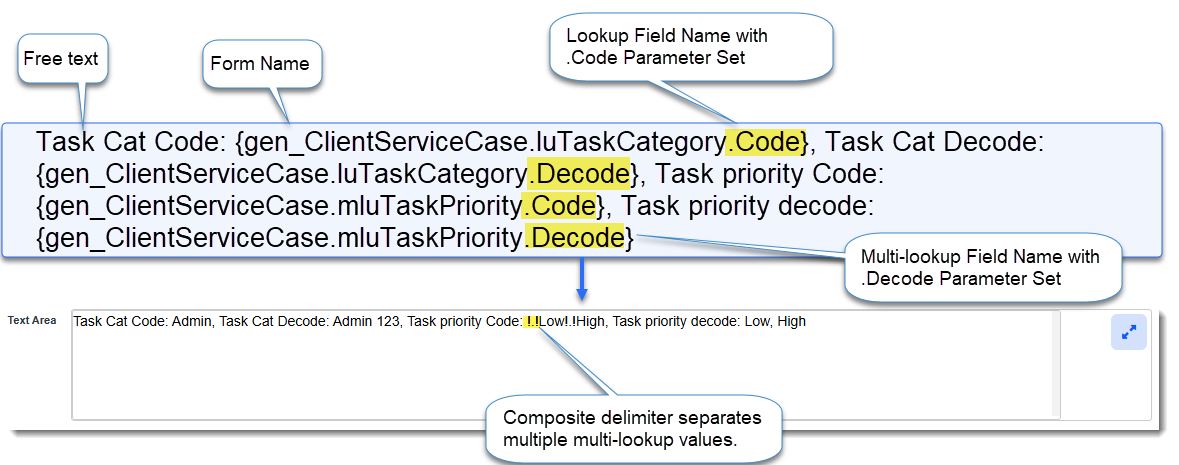
Added Ability to Set Code or Decode Values from a Lookup and Multi-Lookup Fields in a TargetField Using the _ModifyFieldValue Method You can now set a Code or Decode value from a Lookup or Multi-Lookup field in a specified target field on any main form, child tab, singleform (in the same workspace) or related multi-form when using the _ModifyFieldFieldValue business rule method. This is achieved by entering a formula in the Value field of the _ModifyFieldValue "Method Parameters" section that includes either a .decode parameter to set a Decode value or a .code parameter to set a Code value after the specified lookup or multi-lookup Replace Field name. In the example below, the following formula was added to the Value field which was then translated in the TargetField of the TargetForm (as shown in the image of the field below the formula):
Note:
|
|
73372 |
Enhanced _ModifyFieldValue Method for Date, Time and Date/Time Fields The _ModifyFieldValue business rule now supports the #CurrentDateTime as the Value parameter for Date, Time, or Date/Time target fields. This enhancement automatically formats the current date and time to ensure successful updates without conversion errors. Note: "Overwrite" is the only valid option for the Modification parameter when using a Date, Time, or Date/Time field as the TargetField. |
|
75885 |
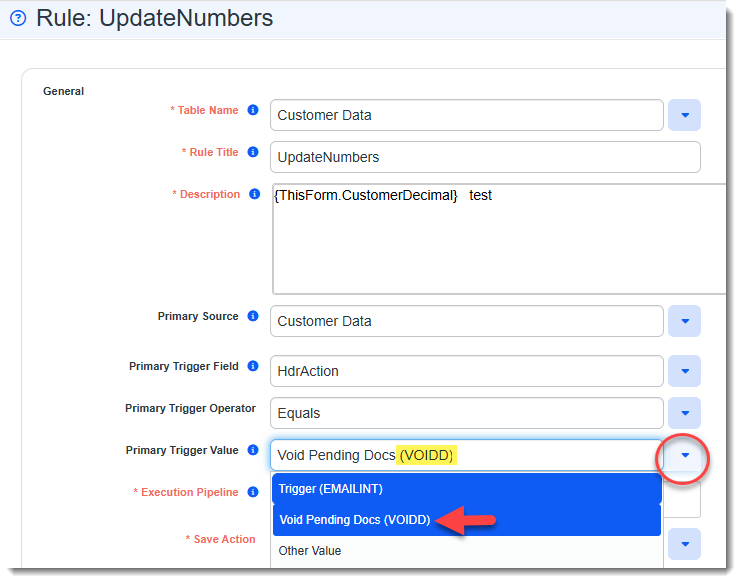
Added Custom Link Code Value Display in Business Rule Configuration When configuring Business Rules using HdrAction as a trigger field (i.e., Primary Trigger Field or Secondary Trigger Field), the trigger value (i.e., Primary Trigger Value or Secondary Trigger Value) drop-down list now displays the value from the Code Value field of the Configure Links Detail form (.i.e, custom link configuration form) in parentheses to the right of the display value as shown in the image below:
Note: If the Code Value associated with the custom link is modified, the drop-down list values on the business rule configuration form are also updated. |
|
76468 |
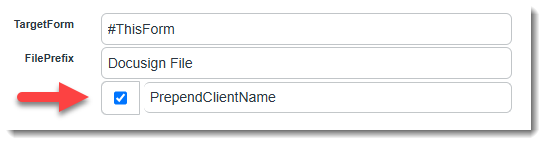
Added Ability to Prepend Client or Project Name for _GenerateMergeFile A new PrependClientName checkbox option has been added to the _GenerateMergeFile business rule (System Admin
If enabled, the client name is prepended to the file name, combined with any File Prefix provided, followed by dash and then a timestamp. EX: ClientName_FilePrefix-YYYYMMDDHHMMSS.ext. Note:
|
|
76791 |
Added I-9 Eligibility Data Import Mapping Enhancement to PrismHR API Ongoing Employee and Employment Imports The PrismHR API Employee and Employment ongoing import mappings (PHRAPI_employee*.csv and PHRAPI_employment*.csv) have now been updated to include the following placeholder mappings:
This update ensures that I-9 eligibility attributes are correctly mapped and imported rather than being skipped or added to the "Excludes" list in the PrismHR Employee subscription record. |
|
76930 |
Added New Business Rule Method to Capture Previous Field Values A new business rule method, _SetFieldFromPreviousValue, allows users to capture the previous value of a SourceField from a triggering form and populate it into a TargetField on a triggering form when a rule using this method is triggered. This method can be used to track historical changes, such as address updates, by storing the prior data in a TargetField before it is overwritten by a new value. An optional AllowBlankValues parameter is also provided to allow you to determine whether the TargetField is set with a blank value if the previous SourceField value is empty. |
| 77063 |
Added Dataform Field Search Module You can now search for fields across all dataforms using the new Dataform Field Search module in the Advanced Administration section of System Admin. This module includes comprehensive Quick Search and More search filtering options for field labels, names, and behaviors, along with saved search functionality. Additionally, a new magnifying glass icon on the Dataform Fields view of Dataform Properties allows users to jump directly to the search dashboard with the current dataform pre-filtered. |
|
77225 |
Updated OBP Import Field Logic Previously, the Dependent Contribution % and Risk Factor fields were highlighted in yellow and marked as modified after an OBP import which blocked further field changes on the form. The import logic now sets the field values and then clears these fields. |
|
77623 |
Modified Assume User Functionality to Easily Revert to Original User Global admin users can now quickly return to their original account after assuming another user by clicking a link in a new banner that displays on the ClientSpace main page under the modules bar.
The banner remains visible even when opening records in new tabs. This change eliminates the need to log out and log back in manually to switch back to the original admin account. |
|
77660 |
Enhanced Global Search Module Security The Global Search results display has been updated to only return modules that the current user has permission to access. This security enhancement ensures that users only see relevant modules, including the Report Center and custom modules, based on their specific access rights. See Global Search. |
| 78426 |
Outlook Add-In Manifest Update The Outlook Add-In manifest has been updated to version 2.1.0.1. This update includes a validation check against the XML schema to ensure continued compatibility and performance. |

General User Enhancements
|
Case |
Enhancement |
|---|---|
|
71382 |
Enhanced Document Search Module The Document Search module has been enhanced to include additional searchable fields for Client Number, File Source, and Secondary ID. You can perform filtering and searching by the new fields as they have been added to More search. Additionally, the Date Uploaded column now includes a timestamp. See Document Search |
|
75975 |
Improved Global Search Empty Date Field Handling Global search results now display a blank value for empty date fields instead of defaulting to January 1, 1900. |
| 76857 |
Added "Inactive Task" Field Restrictions When a task is marked as Inactive, all fields on the Task form now become read-only, with the exception of the Active checkbox. Re-enabling the Active checkbox restores the fields to their previous editable state, ensuring consistency with other Inactive dataform functionality. |
|
76858 |
Added "Inactive Contacts" Field Restrictions When a contact is marked as Inactive, all fields on the Contact form now become read-only, with the exception of the Active checkbox. Re-enabling the Active checkbox restores the fields to their previous editable state, ensuring consistency with other Inactive dataform functionality. |
|
76859 |
Added "Inactive Organization" Field Restrictions When an Organization record is in "Completed" status or marked inactive, all fields now automatically become read-only, with the exception of th Active checkbox. This prevents further edits or comments from being added to completed or inactive records. If the Organization record is reactivated, the fields return to their previous editable state. |
|
77983 |
The Global Search interface now features an updated Search field that expands when clicked and includes a new filtering option. Users can select specific dataforms or system objects, such as Modules or Tasks, from an alphabetical list to narrow their search results, ensuring they only see records relevant to their selection. The filter list automatically respects user security permissions, displaying only the records the user is authorized to access. See Global Search. |
|
78428 |
Added Case Discussions UI Enhancements This update introduces several improvements to the Case Discussions interface, including:
See Case Discussions. |
Fixes
|
Case |
Issue summary |
Resolution |
|---|---|---|
| 77357 |
Removed Email Integration Style Artifacts From Incoming Messages |
Previously, if an Email Integration incoming email message contained HTML style tags, there were intermittent issues of the style tags displaying in the mapped {EmailBody} Email Replace Field (i.e., field being filled with information from the received email) within ClientSpace. Now, Email integration automatically strips style tags from incoming messages to prevent formatting artifacts from appearing in the email body. This update also removes excessive vertical white space to ensure a cleaner and more professional presentation of email content. |
|
77503 |
Corrected Enrolled Benefits Field Filtering Issue |
The Enrolled Benefits multi-lookup field on the Employment dataform is now filtered to only include benefit plans with Active statuses. This change ensures that benefit plans with Terminated statuses are excluded from the lookup value selections. |
|
78350 |
Corrected Business Rule Trigger Field Persistence Issue |
Resolved an issue where newly created lookup fields selected as a Primary Trigger Field or Secondary Trigger Field on a business rule would disappear from business rule after saving. These fields now remain set as both primary and secondary trigger selections upon saving the rule. |
|
78686 |
Restored Multi-Line Update Trigger Operators |
We have restored several missing trigger operators for Multi-Lookup (MLU) fields within Business Rules to ensure full functional parity. Users can once again utilize operators such as Empty, Not Empty, Is Dirty, Equals, and Contains when defining business rule logic. This update resolves an issue where these options were inadvertently removed in a previous release. |