R168 Sprint: 9/1/2026 to 9/30/2026. To learn about product features that you may not recognize, contact ClientSpace Professional Services.
Release Schedule
Release updates are implemented by the group, as indicated in the following table.
The release schedule is subject to change and updated as required. To determine your group or ask questions, please log a case for ClientSpace Professional Services.
|
Sprint 9/1/2026 to 9/30/2026 |
||
|---|---|---|
|
Upgrade groups |
Date of upgrade |
Tentatively occurs on |
| Group 1 | First Tuesday of the month | October 6, 2026 |
| Group 2 | Second Tuesday of the month | October 13, 2026 |
| Group 3 | Third Tuesday of the month | October 20, 2026 |
Enhancements
Enhancement groups are Change in Functionality, ClientSpace Premium (ClientSpace with additional modules), Advanced Administration, General, and Staffing.
ClientSpace Premium
ClientSpace API
|
Case |
Enhancement |
|---|---|
|
76771 |
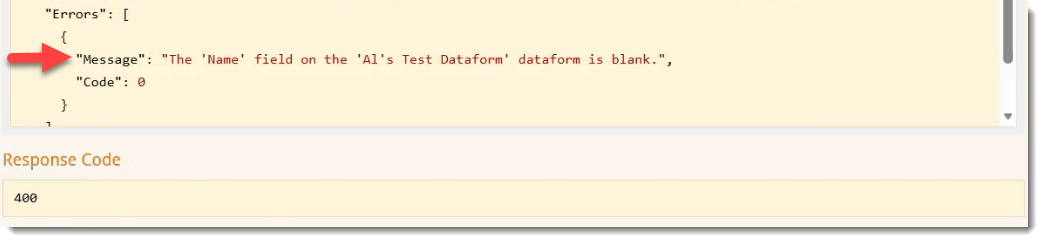
Enhanced ClientSpace API version 3.0 POST, PUT, and PATCH methods in Dataform, Organization, and Task Sections to Support Bypassing "Save Anyway?" Previously, when you ran a ClientSpace API request and a "Save Anyway?" soft error warning was encountered, the Response Code displayed a 400 error and an error message similar to the following displayed in the Response Body:
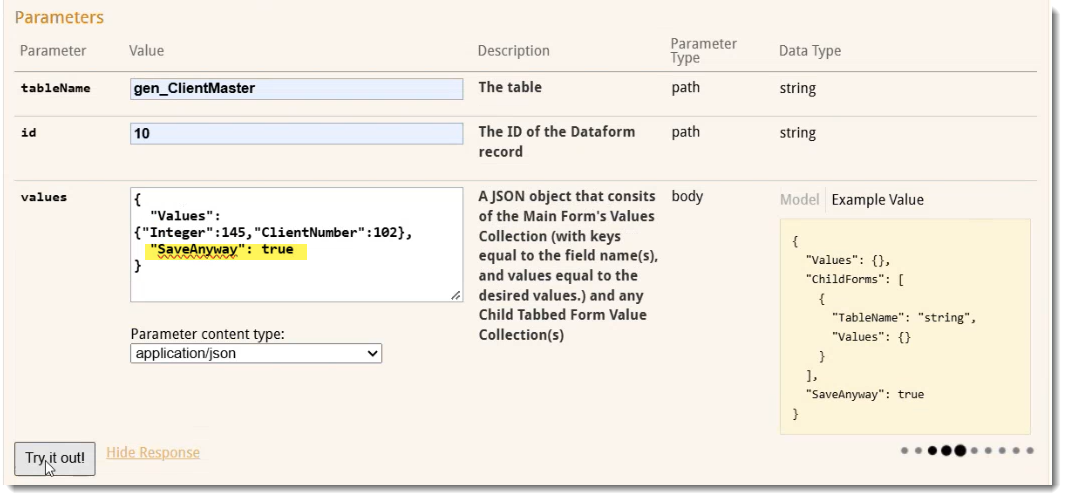
Now, you can set the SaveAnyway parameter on a POST, PUT, or PATCH method in the Dataform, Organization, and Task sections to True to bypass "Save Anyway?" soft errors directly within the request payload, eliminating the need for the Save Anyway URL when testing in Swagger. Use the following format in the values field of the Swagger "Parameters" section: "SaveAnyway: true. This is illustrated in the image below:
Note: Detailed documentation for client developers can be found in the Swagger interface by expanding the Task section and then expanding each method. |
| 76808 |
Enhanced ClientSpace API Version 3.0 Task Method to Support Recurring Task Management The following ClientSpace API Task method endpoints have been updated to provide better visibility into recurring tasks:
These endpoints now include fields to identify if a task is a recurring task template (isPrimaryRecurringTaskTemplate), if it was triggered by a recurrence schedule (isRecurring), and the ID of its source task (RecurrenceSourceTask). Additionally, the task search endpoint, GET /api/task/v3.0/find, supports filtering by these recurring task criteria and includes Date Updated and Date Created timestamps in the response. Note: Detailed documentation for client developers can be found in the Swagger interface by expanding the Task section and then expanding each method. |
Benefit Plan Manager (BPM)
|
Case |
Enhancement |
|---|---|
|
77253 |
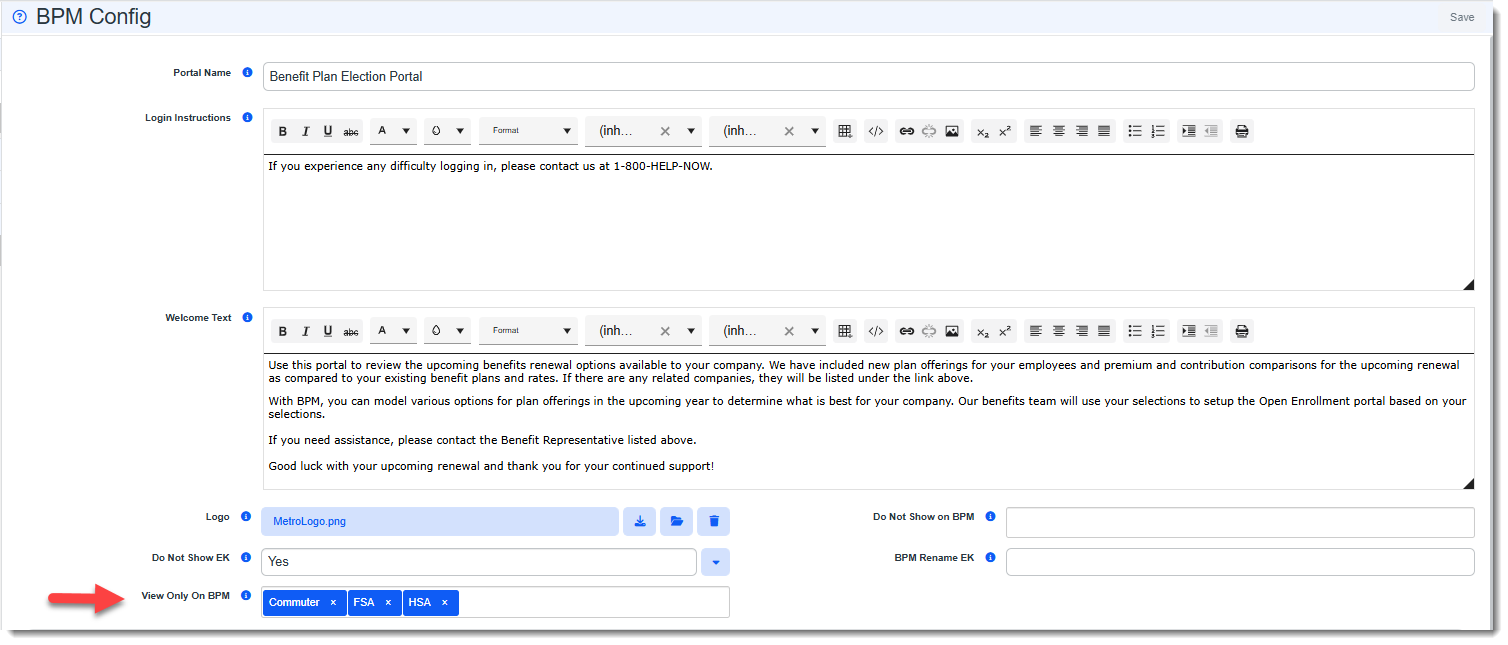
Added "View Only On BPM" Setting for Waiting Period, HSA, FSA, and Commuter Plan A new View Only On BPM multi-select lookup field has been added to the BPM Config dataform in the Admin Workspace. The new setting lets administrators make the Waiting Period, HSA Plan, HSA Contribution, FSA Plan, and Commuter Plan Offered options read-only for clients in the Benefit Plan Manager (BPM). Clients can view the selected items in BPM but cannot change them, and a message in each area indicates that it is read-only. In the example below Commuter, FSA and HSA are selected in the View Only on BPM field of the BPM Config form:
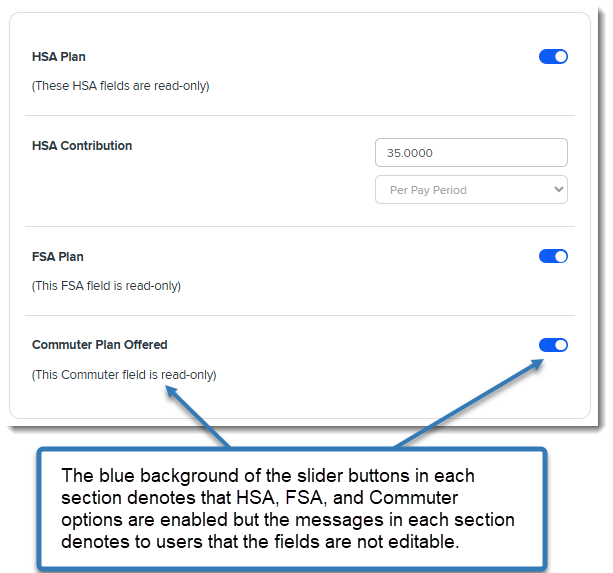
As a result, the HSA Plan, HSA Contribution, FSA Plan, and Commuter Plan Offered areas are read-only for BPM Clients as shown in the excerpt of the panel below from the BPM Selection/Summary page:
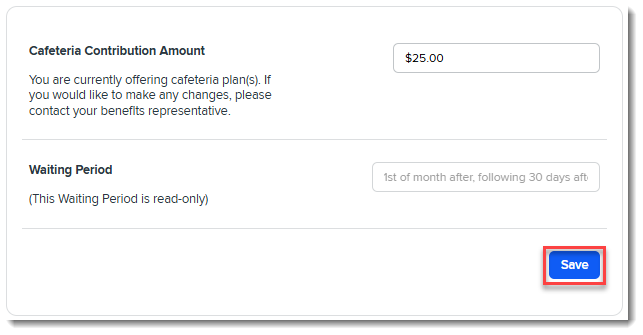
If all options in a panel are set to read-only, the Save button is hidden as shown in the example above. The Save button is available when at least one option in the panel is not read-only as shown in the panel excerpt from the Group Summary page below where Waiting Period is read-only but the editable Cafeteria Plan option is also present in the panel:
The following additional changes were made:
See: |
|
78570 |
Updated BPM Internal BPM Access and Contact Management How BPM manages contacts and validates portal access has been updated to prevent duplicate contact records and improve support for contacts across different workspaces. Internal access: With this update, internal users can access BPM through the Internal BPM Access link without first assigning a Renewal Client Contact via their current user login. When BPM is accessed using your current user account, you will note some slight changes in the BPM display (outlined in the related article) due to there being no client details available. Client Access: Additionally, BPM client access validation is now managed through Additional BPM Contacts, improving support for contacts across different workspaces and providing a more consistent user experience. This means that once you add a Renewal Client Contact for client access and it is automatically added to the Additional BPM Contacts form, validation of the Renewal Client Contact and any other user you manually add to the form is occurring on the Additional BPM Contacts form only. Note:
|
| 78773 |
Added Benefit Batch Cloning Logs for BPM Contacts When using the Clone to Child Batches action on a Benefit Batch, the system now generates an Update Log entry to track BPM Contact changes. This log provides visibility into the process by recording the specific contacts successfully cloned with their access levels, as well as any contacts that failed to clone. |
| 78903 |
Fixed Age Band Display In BPM Resolved an issue in the Benefit Plan Manager (BPM) where age band records with a From Age but no To Age incorrectly displayed "null" in the plan detail pop-up. The From Age and To Age are now required fields. If either field is left empty upon save of a new record OR an existing record (created prior to this update), an error message displays indicating that the field is required. See: |
Other ClientSpace Premium
|
Case |
Enhancement |
|---|---|
|
77041 |
Added Survey Reminder Notifications You can now configure automated email reminders for survey recipients who have not yet completed their surveys by setting offset days in the Survey Reminder field on the Survey Design form. After the specified number of days passes, the Survey Reminder email template that you create triggers the notification. Note:
See: |
|
77155 |
Added AI-Generated Case Discussion Responses Users can now use AI to draft responses in discussion threads from the email composition area of the interface. A new Generate Response button opens a modal window where users can customize the response tone, length, and language while selecting specific case and thread context for the AI tool to reference. Note:
See Using Generative AI to Create Case Discussion Responses. |
|
77426 |
Added Survey Business Rule Methods Two new business rule methods were added to allow setting a field on a related form using primary survey results or "Additional Questions" survey results: SetSurveyResultFieldonTriggeringForm
SetAdditionalSurveyResultFieldonTriggeringForm
See: |
|
78544 |
Added Benefit Parent Company Sync Logic When saving a Benefits Batch, the system now automatically populates the Benefit Parent Company field with the corresponding value from the Client Master if the field on the Benefits Batch is empty. |
|
78652 |
Added Special PrismHR Process for Importing Group Benefit Plans Administrators can now import system-level (master) benefit plans from PrismHR into the ClientSpace Admin workspace without running the PrismHR Initial or Ongoing Import. To support this feature, the following changes were made:
Access is controlled by the new AllowSpecialPrismHRProcesses security entity. Note: Please contact your Professional Services team representative or log an extranet case if you are interested in this feature. See: |
|
78724 |
Added "Renewal Assigned" to Benefits Batch Mass Update and New Child Security Entities You can now update the Renewal Assigned field for multiple Benefits Batch records simultaneously using the Benefits Batch Mass Update tool. This enhancement streamlines workload reassignments and reduces the need for manual, record-by-record updates. Additionally, four new child security entities were added to the existing parent security entity, biz_benefitsbatch_massupdate. Assignment of the parent entity is required. The following additional entities, secured at the Edit and Admin levels, can be used to control individual security access to the various Benefits Batch Mass Update features:
See: |
| 78748 |
Updated Benefit Expirations Scheduled Process The Benefit Expirations scheduled process now automatically inactivates Benefit Batches and Benefit Plans with a status of "Cancelled" or "Cancel." This update ensures that cancelled records are removed from relevant selection lists and reports without requiring manual cleanup. See Scheduled Processes. |
|
78895 |
Added Email Integration Case Discussion Linking A new Email Integration Discussion Linking feature is now available. When enabled, Email Integration can keep an email conversation together on a single case. After the initial case is created by the Email Integration feature, any additional reply emails in the thread are posted to that case's Case Discussions thread instead of creating a new case. The related HTML formatting is preserved and any email attachments are also added to the discussion message. Additionally, any replies sent from Case Discussions to the customer are also kept in the same email thread, so the conversation continues in both directions. If the original case is deleted, a reply creates a new case. Note:
|
|
79086 |
Added Tasks to "Round-Robin" Group Users Assignment and Other UI Enhancements Note: If you are interested in the Group Users Assignment feature, please contact the ClientSpace Professional Services team or log an Extranet ticket. Round-Robin Group Users Assignment now supports Tasks. Once a Group User is set in the Owner and/or Assigned To fields and a Save/Apply action is applied, the fields resolve to the next available user in the rotation. The Tasks functionality is available from following locations:
Additionally, the following user interface changes were made:
Also see:
|
|
79350 |
Improved Benefits Batch Renewal and Plan Cloning Resolved an issue where the Benefits Batch Renewal process was creating duplicate records during mass updates. Additionally, fixed a link error that occurred when a benefit plan renewed from a match could not be found, and improved the cloning process by excluding canceled plans and ensuring new plans are correctly activated and logged. |
|
79457 |
Updated Gradient AI Risk API Version and Rejection Error Handling The Gradient AI Risk integration now uses version 2 of the Gradient AI policy rating API. Previously, submitting a Pricing Console batch with Submit To Gradient AI failed because Gradient AI had changed its API. The following additional changes were also made:
See Gradient AI Risk. |
 icon next to a group member name). This allows quick access to user details such as name, email, phone, company, department, and address without leaving the current view.


Advanced Administration and System Administration
|
Case |
Enhancement |
|---|---|
| 73845 |
Modified _ModifyFieldValue Method Access Global Administrators can now configure rules using the _ModifyFieldValue business rule method, which was previously only configurable by Developer users and restricted to read-only access for Global Administrators. Important: Please thoroughly test each business rule you create using the _ModifyFieldValue business rule method to avoid unwanted data modifications. |
|
74001 |
Enabled Read-Only _FieldCalculation Method Access Global Administrators can now view the business rule configuration of rules using the _FieldCalculation business rule method in a read-only format. This change allows for more effective troubleshooting and rule management without the risk of unauthorized modifications. |
|
76059 |
Improved Global Search Index Update Frequency The Global Search indexing process has been enhanced to update more frequently using an index swapping process, ensuring search results reflect recent changes in near-real-time without a noticeable performance lag. The Populate Global Search scheduled process now runs every five minutes to synchronize the search index with updated records. See: |
|
76065 |
Added Ability to Embed Widgets Within Dataforms Global Administrators can now embed Business Intelligence, Report Center (i.e., Sigma Reports), Image Display, and Query widget layouts within the body of a dataform, instead of only in the dataform header so that users can view related information without scrolling to the top of the form. The following changes were made:
|
|
76550 |
Added Anonymous Survey Support Global administrators can now create anonymous surveys by selecting the new Anonymous Survey checkbox in the survey design template (System Admin Note: The Anonymous Survey setting cannot be changed after the initial save of a survey design. Accordingly, the setting cannot be applied to pre-existing survey designs since these are saved designs. |
|
77917 |
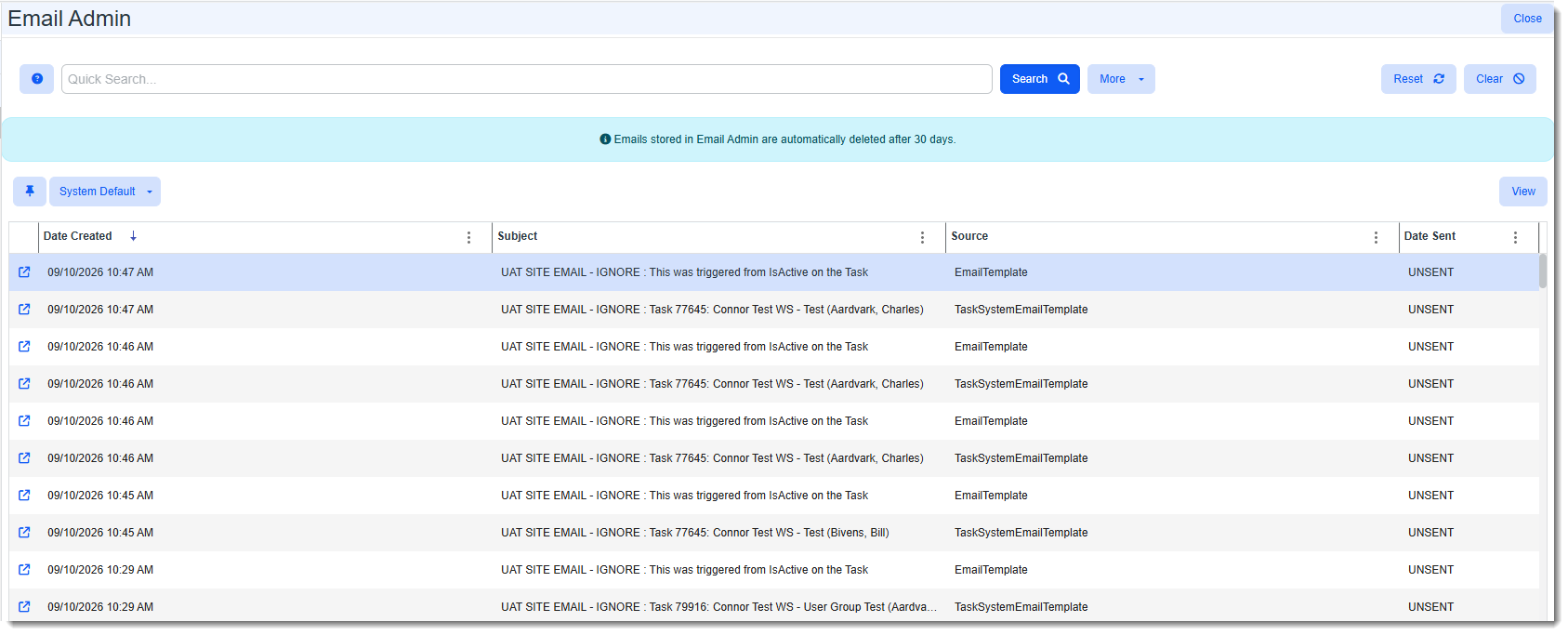
Updated Email Admin Dashboard Data Retention Messaging A prominent message now displays at the top of the Email Admin dashboard to clarify that emails (which includes any associated attachments) are automatically deleted after 30 days.
The related Help Center documentation was also updated. This ensures administrators are aware of the data retention policy. Note: You can take proactive steps, such as saving emails as activities or forwarding them to a separate mailbox, to preserve important records as outlined in the Help topic listed below. See Email Admin. |
|
78707 |
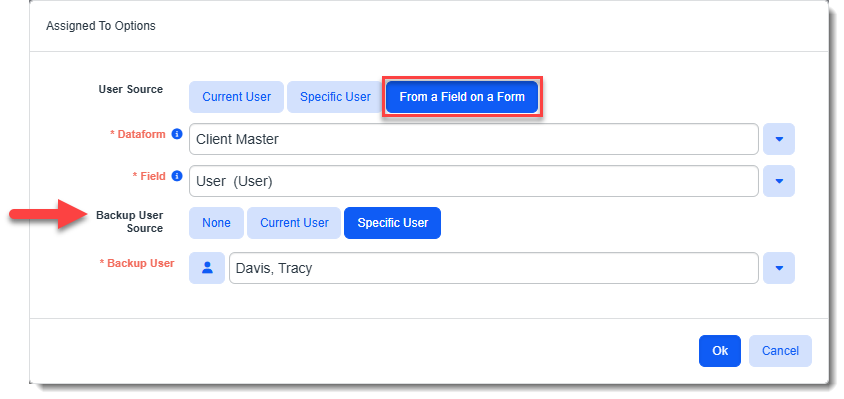
Added Backup User Assignment For Workflow Channel or Item Tasks Administrators can now configure a Backup User for Workflow Channels or Workflow Channel Items where the Triggered Form on Step 1: Channel is set to Task and the Assigned To user or Owner selection on Step 2: Content is set to From a Field on a Form. This ensures that if the primary user on the Triggering Form is unpopulated, the task routes to a Current User or Specific User instead of defaulting to the channel owner.
See: |
| 78773 |
Updated Import Map Header and Detail Work Item Titles ClientSpace system administrators can now more easily distinguish between multiple open Import Map work items in the Work Center pane. The work item titles for Import Map Header and Import Map Detail records now dynamically display the specific Source File name for Import Map Header records and the File Column name for Import Map Detail records. |
General User Enhancements
|
Case |
Enhancement |
|---|---|
|
78709 |
Updated Internal Notes Log Stamp The Internal Notes log stamp now includes the author's department code next to their name, providing immediate visibility into their department. This change applies globally to all sites using department codes and affects only new notes added after the update. |
| 78723 |
Added Report Center peo_vwEEActiveCountPerClient Database View A new Report Center database view, peo_vwEEActiveCountPerClient, has been added to pre-calculate active employee counts per client. This change improves performance for the aging report by removing heavy employee-level joins, preventing report timeouts on large client sites. See PEO View Listing |
|
78913 |
Updated Save State Behavior for Search Dashboards When you save your work items, a search dashboard's current search criteria are now preserved and restored when you select Resume Saved Work Items. Previously, if the dashboard included a pinned search under Saved Searches, the pinned search was restored instead of the search criteria that were active when the state was saved. See Work Center. |
|
79219 |
Enhanced Case Discussion Reply Interface Updated the Case Discussion interface to integrate the Reply panel within the message thread. This change allows you to scroll through the entire discussion history while drafting a response without needing to hide the Reply panel to reference previous messages. |
Technical Enhancements
|
Case |
Enhancement |
|---|---|
|
72954 |
Removed Document Service Dependency The legacy Document Service dependency has been removed from the Core Classic and Core Next environments. This internal cleanup ensures that all document-related functions now utilize the updated Azure Functions architecture, allowing for the eventual archiving of the old service. |
Fixes
|
Case |
Issue summary |
Resolution |
|---|---|---|
|
79479 |
Fixed Document Search Module Error |
Previously, the Document Search module sometimes displayed an error and did not return results when a search was run. This issue is resolved, and Document Search now returns results as expected. |
| 79502 |
Fixed Quick Clone of Cases With Attachments |
Previously, when a user Quick Cloned a case with attachments included, the clone failed with an error if any of the attachment files had been moved to file storage. Quick Clone now retrieves those attachments from file storage, and the case is cloned with its attachments as expected. |